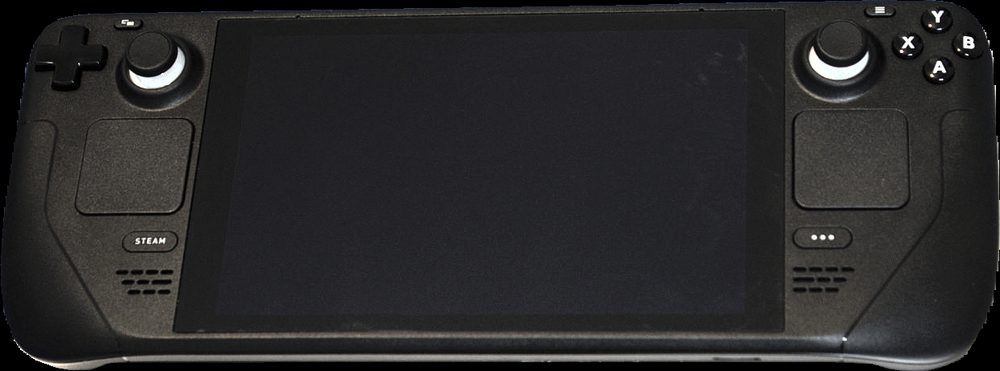
Photo: Wikimedia Commons (CC BY-SA 4.0)
Short answer: The best educational games on Steam Deck are ones built around short, repeatable sessions rather than long uninterrupted play, since that matches how people actually pick up a handheld device. Puzzle and logic games, typing and coding trainers, and language learning games like Noun Town, which costs $19.99 as a one-time purchase and supports 12 languages, all tend to hold up well on the Deck's smaller screen and gamepad controls.
Steam Deck changed how a lot of people fit games into their day. Instead of sitting down at a desk, you pick it up on a sofa, on a train, or during a break, play for ten or fifteen minutes, and put it down again. That pattern happens to suit certain kinds of educational games extremely well, and suit others rather badly.
This post looks at what actually makes an educational game work on a handheld screen, then runs through solid picks across a few genres, including where a language learning game fits into a Deck routine.
Not every game designed for a desktop monitor translates well to a 7 inch handheld screen. A few things separate the ones that hold up from the ones that do not.
Steam itself flags this with a compatibility badge on each store page, Verified, Playable, or Unsupported, which is worth checking before buying anything specifically for Deck use.
Language practice is a near-perfect fit for handheld sessions. The core loop, review a word, hear it, try to recall it, is short by design, which is exactly the kind of interaction a Deck session rewards. Noun Town teaches vocabulary across 12 languages through a 3D open world rather than flashcard drills, using native speaker audio, a spaced repetition system and speech recognition for pronunciation practice.
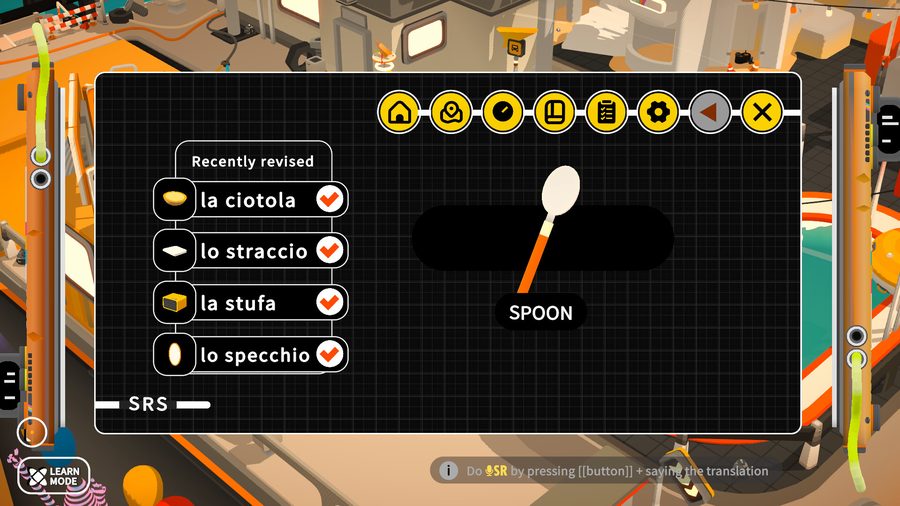
Screenshot from the Noun Town Steam store page, showing the spaced repetition review screen
Puzzle games are one of the most naturally handheld-friendly educational genres, since most were designed for touchscreens or simple controller input from the start. They tend to teach spatial reasoning, pattern recognition and problem solving without needing a keyboard at all, which makes them low friction on the Deck.
7 Billion Humans, from Tomorrow Corporation, is a good example. You automate crowds of office workers through a simple visual programming language to solve puzzles, and Steam's own review filters let you sort feedback specifically from people who played mostly on Steam Deck, a sign of how many owners already use it that way. Its predecessor, Human Resource Machine, teaches similar assembly-style logic in a smaller, more linear form and holds up just as well handheld.
This is the trickiest category for a handheld device, since typing games obviously assume a physical keyboard. Some titles work around this with on-screen or controller-based input schemes for shorter drills, but anyone serious about typing or coding practice will generally get more out of these on a desktop with a real keyboard attached, or by pairing the Deck with a Bluetooth keyboard for longer sessions.
Simulation-style educational games, covering everything from historical strategy to geography quizzes to basic physics sandboxes, generally translate well to Deck as long as the UI has been designed or scaled for smaller screens. Text-heavy strategy games with a lot of tiny menus are the main exception worth checking carefully before buying.
Kerbal Space Program is a solid pick if orbital mechanics and rocket design count as educational content for you, which we would argue they do. It has native Linux support, which tends to translate into smoother Deck performance than titles running purely through Proton, though as with anything on Deck it is worth a quick check of the current compatibility notes before buying, since patches can change things over time.
The single biggest factor in whether an educational game feels good on Steam Deck is not really its subject matter, it is whether the core loop was designed for short, repeatable interactions. A spaced repetition vocabulary review, a five minute puzzle level, or a short geography quiz all fit naturally into a handheld session. A dense strategy game with hour-long turns does not, no matter how educational its content is.
This is also why spaced repetition specifically, the scheduling technique behind most effective vocabulary and flashcard systems, tends to work so well on handheld devices generally. It is built around short, spaced check-ins rather than long study blocks, which happens to be exactly the rhythm a device you pick up and put down all day naturally produces.
Want to try a language learning game built for short, repeatable sessions? There is a free demo on Steam.
Try Noun Town on SteamReadable text at a smaller screen size, controls that work with a gamepad or touchscreen rather than requiring a mouse, and reasonable battery draw for handheld sessions are the main factors. Games designed with heavy reliance on tiny UI text or mouse-only menus tend to be frustrating on the Deck's 7 inch screen.
Yes. Noun Town is Steam Deck verified. Getting there took a fair amount of back and forth with Valve's approvals team, with control mapping and font sizing being the two biggest hurdles, but it now runs cleanly on the Deck and has thousands of players using it that way.
Yes, arguably more so than on a desktop. Handheld devices are naturally suited to shorter, more frequent sessions, which matches how spaced repetition and vocabulary practice are meant to be used, in regular short bursts rather than one long cram session.
Noun Town is a one-time purchase of $19.99 on Steam, covering all 12 supported languages. There is no subscription and a free demo is available.
Yes. Language learning games built around vocabulary, listening and speaking practice, such as Noun Town, work well as handheld titles since sessions are naturally broken into shorter, repeatable chunks rather than requiring long uninterrupted play.
Puzzle and logic games, coding and typing trainers, history and geography simulations, and science-themed building or physics games are all well represented on Steam and generally handheld-friendly, provided their UI scales to a smaller screen.
Less than for demanding action games. Most educational titles are not graphically intensive, so they tend to be gentler on the Deck's battery than fast-paced 3D shooters or open world action games, which helps for longer handheld sessions.
No. Noun Town has no adverts and no content locked behind an extra paywall once you own the game. The team built it this way after getting frustrated with ad-supported and freemium mobile apps themselves, and hearing the same complaint from thousands of other learners.
Both work well, but many players find handheld sessions suit the game's short, repeatable vocabulary loop particularly naturally, similar to how people pick up a phone for a quick app session, except with a full 3D world and native speaker audio instead of flashcards.
Yes. Steam displays a compatibility badge, such as Verified, Playable or Unsupported, on each store page, and it is worth checking this before buying if handheld play is your main use case, since controller and touchscreen support can vary between titles.