
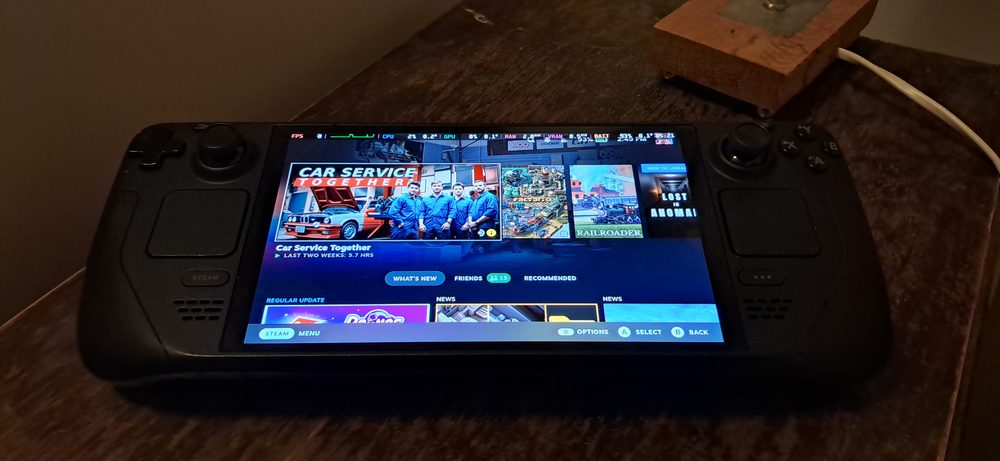
Photo: SparklesTrainNerd / Wikimedia Commons (CC BY-SA 4.0)
The Steam Deck is Valve's handheld gaming PC, built to run the same Steam library as a desktop computer rather than a separate, simplified console catalogue. As of late 2026 it comes in two OLED models, 512GB for $789 and 1TB for $949, after a price rise earlier in the year tied to a global memory chip shortage. Whether that makes it a good choice for a child has less to do with the hardware itself and more to do with what's already built into the Steam account behind it, since the Deck runs full Steam rather than a stripped-down version of it.
Short answer: it can be, for a child roughly eight and up who's already comfortable with a controller, since it comes with the same free Steam Families parental controls available on any PC. It isn't a dedicated kids' device though. There's no separate kid mode, no drop protection built in, and the current price of $789 to $949 makes it a bigger investment than a typical console.
It helps to be clear about what the Steam Deck is not before getting into whether it suits a child. It isn't a kids' tablet with a curated app store, and it isn't a console with a manufacturer-approved rating system baked into every title. It's a small Linux-based PC, running an operating system called SteamOS, with a controller built directly into the case around a 7.4 inch touchscreen.
That distinction matters because it means the Deck inherits the entire open Steam catalogue, warts and all, rather than a pre-filtered selection. A parent isn't choosing from a shelf of things a platform holder has already screened for family friendliness the way a first-party console storefront sometimes is. Whatever a child can access is whatever the Steam account signed into that Deck can access, which puts the responsibility for filtering squarely on how that account is configured.
On the other hand, that same openness is what makes it capable of running genuinely useful things beyond big action games, including strategy titles, puzzle games, and educational software originally built for desktop PCs. According to Wikipedia's overview of the device, it launched in 2022 and has since become one of the most widely adopted handheld PCs on the market, which has also meant more developers specifically testing their games for its controls.
Yes, and this is the part that gets missed most often. Because the Steam Deck runs the exact same Steam software as a desktop PC, it also runs the exact same Steam Families system, the parental controls we've covered in more detail in our own guide to setting up Steam parental controls. A parent can restrict a child's account to an approved list of games, cap playtime, review activity, and require purchase approval before anything new gets added to the library, all from the same settings menu whether the account is being used on a desktop, a laptop, or the Deck itself.
What doesn't exist is a Deck-specific simplified mode. There's no big-icon, toddler-friendly launcher layered over the top the way some tablets offer. A child navigates the same Steam interface an adult would, just through the Deck's built-in controls instead of a mouse and keyboard. For an older child that's rarely an issue. For a much younger one, it's a genuine adjustment.
Checking a title against its ESRB rating before adding it to an approved list is still worth doing, since the Deck doesn't apply a platform-wide age filter automatically the way a kids' tablet profile often does. A resource like Common Sense Media's game reviews can also fill in the gap between an age number and what a specific game is actually like to play.
Pricing has moved noticeably in 2026. A memory chip shortage pushed component costs up across the industry, and Valve raised Steam Deck OLED pricing partway through the year as a result. The older, cheaper LCD models have also been fully discontinued, so there's no longer a lower-cost entry point into the lineup.
| Model | Storage | Price (2026) |
|---|---|---|
| Steam Deck OLED | 512GB | $789 |
| Steam Deck OLED | 1TB | $949 |
| Steam Deck LCD (discontinued) | 256GB | No longer sold new |
That's a meaningful jump from the device's original launch pricing a few years earlier, and it changes the calculation for a lot of families. A Steam Deck bought specifically for a child now sits closer to the price of a mid-range laptop than a typical handheld console, which is worth weighing against how much use it's actually likely to get before committing to one as a gift.

Screenshot from the Noun Town Steam store page, showing the kind of simple, contextual scene younger players pick up quickly
There's no official minimum age printed on the box, since the rating system applies to individual games rather than the hardware itself. In practice, the controls are the bigger factor than any rating. Two analog sticks, four shoulder buttons, a directional pad and two trackpads is a fair bit for a child who has only used a touchscreen before, and it takes some of them a session or two to get comfortable with where everything is.
A child who already plays on a console with a similar controller layout usually adapts within minutes. A much younger child, or one who has only used tablet apps up to this point, is likely to find the control scheme itself the main barrier rather than anything about the content on it. Somewhere around eight years old and up tends to be where the device starts feeling intuitive rather than fiddly for most kids, though that obviously varies a lot by individual child.
Durability is the other practical concern. The Deck is a handheld PC, not a toy engineered for drops, so a protective case is worth budgeting for alongside the device itself if a less careful child will be the main user. This isn't a device built to survive being dropped down a flight of stairs the way some kids' tablets are specifically designed to.
Because the Deck runs the full Steam library, the more useful question for most parents isn't whether educational games exist for it, they clearly do, but which ones are actually worth installing. A few things are worth looking for specifically:
Our own language learning game, Noun Town, is one example built with those points in mind. It's a PC and Mac title, so it runs on Steam Deck the same way it runs on a desktop, no special setup or workaround required. It's a $19.99 one-time purchase covering 12 languages, with no ads and nothing locked behind a further paywall once it's bought, which was a deliberate choice after the team behind it got frustrated using the big mobile language apps themselves and heard the same complaint from a lot of other learners too.
A free demo is available on Steam if you want to check how comfortable a specific child finds the controls before buying anything, which is a smaller commitment than approving a full purchase through Steam Families sight unseen.
For a family that already has an older child gaming on a PC or a console with a similar controller, adding a Steam Deck to the mix is a reasonable, if now fairly expensive, way to get portable access to the same library, with parental controls that carry over exactly as they are on desktop. The American Academy of Pediatrics' guidance on children's media use still applies here as it would to any screen, worth keeping in mind alongside whatever in-platform limits you set.
For a younger child, or a first gaming device of any kind, it's a harder sell at 2026 prices. A simpler, cheaper device built specifically for a young child's hands is likely to get more comfortable early use than a general-purpose handheld PC that assumes a fair amount of controller experience already. The Steam Families controls are genuinely solid once set up, they just aren't a substitute for matching the device itself to the child's age.
See how a language learning game plays with a controller. Try the free demo first.
Try Noun Town on SteamIt can be, for a child roughly eight or older who can already handle a controller comfortably. It runs the full Steam Families parental control system, so a parent can restrict games, set playtime limits and require purchase approval, but there is no separate simplified kid mode built into the device itself.
The current OLED models are priced at $789 for 512GB and $949 for 1TB, following a price increase earlier in 2026 tied to a global memory chip shortage. The older LCD models have been discontinued and are no longer sold new.
Yes, the same Steam Families system available on desktop Steam works identically on a Steam Deck, since it runs the same account and the same Steam software. That includes restricting which games a child profile can open, playtime limits, activity reports and purchase approval.
There's no official age rating for the device itself, only for the games played on it. In practice, the two analog sticks, four shoulder buttons and touchpads suit a child who already has some experience with a console controller more than a very young child who has only used a tablet.
Yes. Because the Steam Deck runs the same Steam library as a desktop PC, any educational or language learning game sold on Steam that supports controller input works on it without a separate handheld version.
Yes. Noun Town is a PC and Mac title distributed through Steam, so it runs on Steam Deck without any special setup, the same way it runs on a desktop or laptop.
Valve's own estimate for the OLED model is roughly 3 to 12 hours, depending heavily on how demanding the specific game is. A lighter game with simpler graphics sits toward the longer end of that range, while a graphically intensive title drains it much faster.
It's a handheld PC rather than a toy, so it doesn't have the drop resistance built into most console-branded kids' devices. A protective case is a sensible add-on if a younger or less careful child will be using it regularly.
Not for playing games you already own and have downloaded. Wi-Fi is needed to buy new games, install updates, and for online multiplayer, but a single-player game already installed on the device can be played fully offline.
It depends what the games are. A tablet suits touchscreen apps and casual games better, while a Steam Deck suits proper PC games with physical controls, longer play sessions and no ads or in-app purchase prompts wedged between levels.